Friday, November 25, 2011

Black Friday Savings Minus Crazed Crowds

As I was getting ready for work this morning, I turned on the TV, occasionally glancing over when I heard anything interesting. Black Friday news is always rather entertaining and shocking simultaneously. So when I heard the news anchor talking about a store pretty close to the office, I looked over to see what the commotion was about.
A woman at a local WalMart was on such a mission to cross off all the stuff on her list that she decided to pepper spray anyone who dared to be in her way. Later at the office, I saw another video of a riot over a $2 waffle maker...

Really? Who on earth would want to go through that? To what limit will we go to save a few bucks? I personally prefer to stay home and do all of my Black Friday / Cyber Monday shopping from the comfort of my warm and comfy couch, with my sweats on and a nice cup of hot cocoa to sip.

This weekend, you too can shop from home and save a bundle, without getting pepper sprayed or trampled. If you've shopped with us before, you know all about our Reward Points. Basically, with every purchase you make at AccessoryGenie.com, you earn a certain amount of Reward Points, depending on which items you purchased. These points can in turn be used as credit on future AccessoryGenie.com purchases!
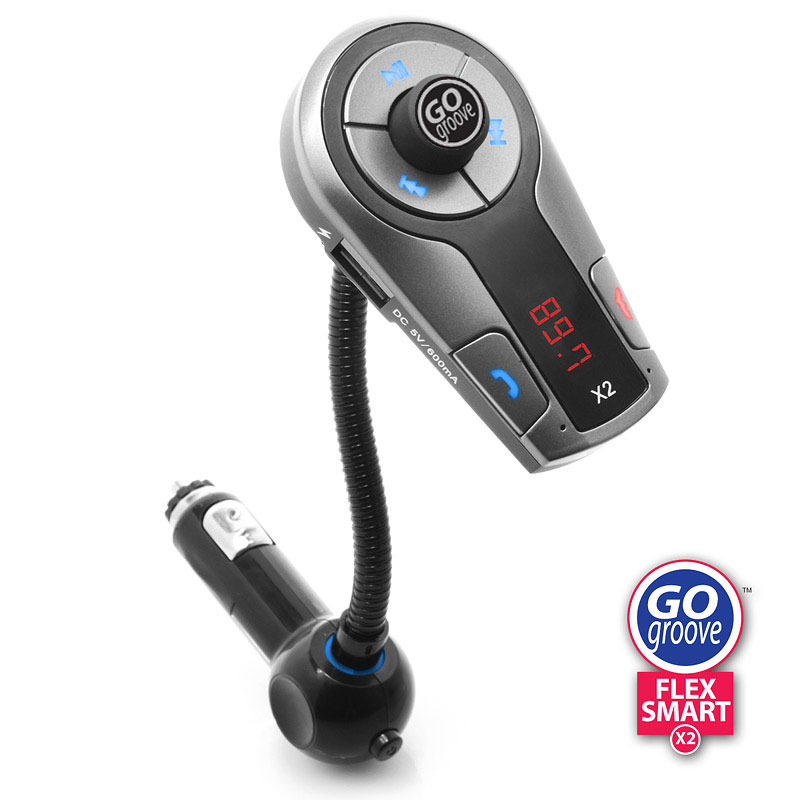
From today through 5:00 PM on Cyber Monday (11/28/2011), your Reward Points are worth double the amount! That means you can save twice the amount on many of our popular electronic accessories, including the GOgroove FlexSmart X2, AudiOHM earbuds, and the AudioACTIVE!

To check out how many Reward Points you have earned, visit AccessoryGenie.com and click the yellow "Accessory Genie Login" button at the top right. After you have filled out the correct email and password, your Reward Point will display at the top left of the home page!

Don't have an AccessoryGenie.com account? No problem! Click on the save "Accessory Genie Login" button on the homepage and fill out the short form to be on your way to AccessoryGenie.com savings!

In my opinion, shopping from home certainly beats dealing with cold weather, crazed crowds, and pepper spray any day.

-Jinni 

Friday, November 18, 2011

Staying Neutral - Our Lowdown on the Kindle Fire and Nook Tablet

There was so much buzz around the Amazon Kindle Fire when it was first announced back in September that I even considered buying one for myself. I think that we at Accessory Genie may have noticed it more than others, especially when most products that were compatible with the Kindle Fire suddenly started flying off the shelves.

Regardless of the lack of news coming from Barnes & Noble, I always had a hunch that they weren't about to let the Kindle Fire take over the "e-reader gone tablet" scene. And low and behold, turns out Barnes & Noble had a little announcement of their own, telling the world of the new Nook Tablet a week before the Amazon Kindle Fire.

And so the competition began, or at least from what we, the public, saw. Barnes & Noble didn't stop there. The Nook Tablet just happened to be available to the public the same week as the Kindle Fire was sent out. Oh, and remember how the Kindle Fire was shipped a day ahead of schedule? Barnes & Noble decided that their customers would receive their Nook Tablets TWO days ahead of schedule.
With all of this evident competing, it's no wonder why almost every tech and news site out there is comparing either tablet to the other. And from what I've personally seen and heard, the competition is pretty close.

Both budget-friendly tablets are designed serve their purpose in the most simple and efficient way. Physically, neither tablet is especially different or particularly appealing; the Nook Tablet used the same design as the Nook Color, and the Kindle Fire just looks like the regular 7-inch Android tablet.

With such closeness in price, the only reason I can see to prefer one tablet over the other is whether you're an Amazon/Kindle person or a Nook person. Aside from being $50 cheaper than the Nook Tablet, the Kindle Fire is really designed around Prime. Prime is like the VIP of Amazon, costing members $79 a year and allowing them to enjoy unlimited videos, free and quicker shipping, and what is essentially a free library where users borrow and read books a month at a time.

However, if you're not a fan of Prime and don't mind the extra $50, why not give the Nook Tablet a chance? Although not by much, the Nook Tablet's specs were generally better than the Kindle Fire's, after all.

Whatever tablet you choose, make sure to check out our speakers and cases compatible with both the Nook Tablet and the Kindle Fire. Clearly, we chose to not be involved in this continuous battle between the extremely similar e-readers-turned-tablets.

-Jinni

Friday, November 11, 2011

Affordable Headphones Without Compromising Quality

To say that I am happy with my Apple products would be an understatement. It all started with my 3rd generation iPod Classic, and as I bought my MacBook, my iPad and my iPhone, I became more and more convinced that Apple in general delivers quality products.

BUT I am also convinced that Apple is not good at one thing: earbuds. Sure, they get the job done. And it is nice to buy an iPhone or an iPod and not have to worry about buying another pair of earbuds. But as far as comfort goes, Apple in-ear headphones did not make in onto my favorites list.

Solution? I have several! When using my iPod, I'm pretty attached to AudiOHM earbuds. They're probably the most comfortable earbuds I've ever worn, and the noise-isolating feature is great for helping me focus at work or avoid being social.

One feature that I did appreciate from my Apple earbuds was the remote and microphone built into the wire. Although I did use them for driving, the microphone came in handy when my hands and shoulder weren't free to hold onto the phone while in the middle of a conversation. They were great when I was cooking, folding laundry, or when shopping at the grocery store (although I did get weird looks from strangers who thought I was talking to myself).

But as with my iPod's earbuds, they became increasingly uncomfortable. Luckily around the time that I was ready to retire the uncomfortable earbuds, GOgroove came out with the DynaMIX earbuds, which are not only incredible comfy, but they also have an in-line microphone AND control for switching tracks, answering and ending calls, and playing or pausing music.
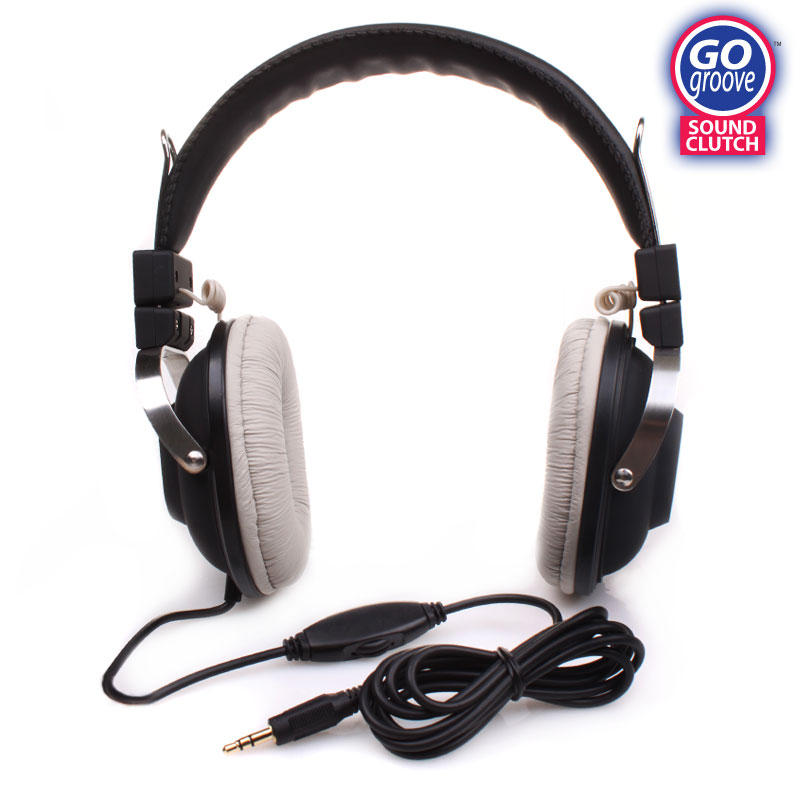
Although it's not exactly a fashion-forward accessory for us ladies, my favorite headphones to use are the GOgroove SoundCLUTCH Over-Ear Headphones. When it comes to quality and comfort, these headphones are the by far best ones I've ever tried. With cushioned, noise isolating earpads and an adjustable headband, these headphones are so nice to wear that I would forget I was wearing them if it wasn't for the crystal clear audio coming out of them.

Best part of all? All of the earbuds and headphones mentioned above are reasonably priced, saving you money without compromising quality!

-Jinni

Friday, November 4, 2011

GOgroove Pal Family Has a New Member!

Being the proud owner of a Panda Pal and a Koala Pal speaker system, and of course, a lover of all things CUTE, this post may be a little biased.

When I saw this little gal make her first appearance at Accessory Genie headquarters, I knew that it was love at first sight. And after seeing all of its little quirks and unique features, I could hardly contain myself! I had to complete my collection of the GOgroove Pal family and get MAMA Panda Pal!

MAMA, as I we like to call her, is as versatile and powerful as her family members. With a 3.5mm cable, you can connect and play audio from any media device with a 3.5mm plug, including smartphones, MP3 players, laptops, desktop computers and more.

In addition, MAMA is powered by the included AC power adapter and cable, or by 4 AA batteries, making this speaker system great for use at home and at the office, or at the beach or park!

When turned on, MAMA's little nose glows red! And adding to her cuteness, the volume is controlled by her touch-sensitive ears!

Since its starting to get cold out, my MAMA Panda Pal is stationed in my kitchen at home, where I listen to music from my iPad as I read cooking instructions from my Epicurious app. But come summer 2012, MAMA will definitely be hitting the great outdoors, joining me at the beach, camping, and on family outings.

My 5 year old niece has also developed a recent obsession with MAMA, and always tries sneaking her out of the house to take home. Little does she know, she's getting her own MAMA Panda Pal for the holidays!

With the holidays fast approaching, the MAMA Panda Pal arrived just in time as the perfect gift for friends and family, adults and kids!

-Jinni

Friday, October 28, 2011

How to Enjoy (or At Least Survive) Mondays

Ever wondered why Friday is such a magical day? Why you can go to sleep on Thursday night unusually happy? Why Fridays in general seem to be better days at work? Eight more hours, and it's officially the weekend.

For two days, you don't have to drive to the same office, sit at the same desk and do the same job you do for (at least) eight hours a day, five days a week. The crazier part is that I actually LOVE my job and I still feel this abnormal delight on that last day of the work week. I can't imagine how glorious 5:00 PM on a Friday afternoon must be to people who really dislike their jobs.

And Mondays. Oh Mondays. After only two days of freedom, why is it always so difficult to somehow find the will to roll out of bed and get to work? Why is it always so tempting to call in and fake a cold or say you ate some bad sushi the night before? Again, I actually enjoy coming to work most days. Can't imagine how dreadful Mondays are when you can't stand your job.

To avoid having a case of the Mondays, I like to make my desk as cheery of a place as possible.
I keep several things that make me feel happier to sit at my desk in general. Since I unfortunately sit under the air conditioning vent, I have a designated Snuggie (yes, a Snuggie) that I use whenever it gets chilly. I also keep my drawers well stocked with snacks.

My Koala Pal is connected to my computer and sits on my desk to keep me company. He's my little buddy and companion at work, not making a peep when I don't feel like listening. But the moment I give him the okay and he'll play my favorite office music, and look cute doing it!

The newest addition to my desk is the TECHnamouse Precision USB Optical Mouse! This light blue mouse is designed for gamers, but looks great on my desk at work. Aside from being extremely comfortable and easy to use, the bright blue and silver paint job and distinct design gives it a unique feel! The most fun I have using it is after lunch, when I sit in my office with the lights turned off for an hour or two. That is when the glowing blue LED light is most visible and most entertaining to use!

The way I see it, I sit at this same desk in this same office for at least 40 hours a week. Why not make it a more pleasant and comfortable environment? At the very least, it will make Mondays a lot easier to make it through.

-Jinni

Friday, October 21, 2011

Having it All: Using Your Smartphone Without Worrying About a Dead Battery

Do you remember a time before smartphones? I know it's difficult to imagine life before your smartphone, but there was a time before you could Check-In on Facebook, find good restaurants in your area on Yelp, and play Words with Friends with your cousin who lives on the other side of the country.
Before upgrading to the iPhone, I had a hot pink Motorola RAZR. And even after texting all day, every day (T9!) I could easily go at least a day and a half without having to charge my phone. For the most part, this is not the case anymore. In fact, I'm lucky if I make it to the end of the work day without having to charge my phone.

A co-worker of mine with the same problem (let's face it, if you have a smartphone, you probably have the same issue) came up with a great solution! During the day, he uses the ReVIVE Series Uni-Charger to charge his spare smartphone battery. Once his phone's battery is drained, he switches the batteries, giving him battery life until the next morning!

I thought this was a very creative way to keep your phone alive and well, especially since AC and DC chargers aren't always available.

Unfortunately for us iPhone owners, we don't have the option of switching out batteries. But using an enerG4 from Accessory Power is a great alternative!

The enerG4 iPhone 4/4S Extended Battery Case provides your iPhone with a nice boost in battery life, providing 40 extra hours of music listening, 13 hours of talking on the phone, and 10 hours of video and web browsing!

The ON/OFF switch on the case lets you decide when you're ready for an extra power boost, and will allow you to charge both your iPhone and the enerG4's batteries without removing the case! In addition, the case is also very protective, keeping my iPhone safe and sound.

My co-workers also like the fact that it's black and unisex. Although I do miss the good ol' days of the hot pink RAZR!

But don't worry, I had my enerG4 bejeweled.

-Jinni

Friday, October 14, 2011

How to Kill (and Not Kill) a DSLR Camera

On a recent camping trip, my friends and I decided to go on a hike and get in touch with Mother Nature. After packing a few backpacks with water bottles and healthy snacks, I noticed my friend, Drew, wrapping his digital SLR camera around his neck. Drew is pretty big on photography, so I knew he would bring his camera along. But what I found odd was that all he brought was the camera with its strap - no camera bag or sleeve to make sure his camera was safe.

"It'll be fine," he said.

We were having a blast while on our hike, until we reached a small creek that had to be crossed to continue. There were plenty of rocks that we could use as stepping stones, and one by one we safely and dryly crossed over to the other side.

That is until it was Drew's turn. While hopping from one rock to another, Drew lost his balance and fell, his camera crashing into another rock before landing in the water. After attempting to save his camera, we declared it as a lost cause.

A few weeks later, Drew came over to my house to show off his brand new DSLR camera. After witnessing his last camera's demise, my first reaction was "What kind of case did you get for it?"
"Oh I don't need one. It'll be fine."
Where had I heard that before...?

I showed Drew my USA Gear Deluxe dSLR Zoom Bag while explaining that after experiencing what he had, he of all people should realize the importance of a camera bag. Had his camera been in my Deluxe dSLR bag, his camera would have been well protected against crashing into the rock AND being submerged in water.

"It's too big for my taste," he said.

Well, good thing that Accessory Genie's sister site Bags-Cases.com carries a variety of camera bags and cases to accommodate every photographer's needs! We carry camera bags designed to comfortably and securely hold your dSLR camera and its accessories, without adding extra bulk.

Whether you're looking for a messenger bag, shoulder bag, or backpack, our bags and cases will protect your dSLR camera against drops and falls, rocks and water.

In the end, Drew decided to go with the USA Gear dSLR Camera Zoom Holster. Since then, he has slipped and fallen over a fair share of stones and puddles. But his camera has stayed safe and sound!

 Can't say the same for Drew, though.

-Jinni